Subscribe
The Carousel
No Result
View All Result
  • Beauty & Fashion
  • Wellness & Health
  • Travel & Leisure
  • Food & Drink
  • Lifestyle & Homes
  • News
  • About Us
  • Beauty & Fashion
  • Wellness & Health
  • Travel & Leisure
  • Food & Drink
  • Lifestyle & Homes
  • News
  • About Us
No Result
View All Result
The Carousel
No Result
View All Result
Home News World

Handle: How To Manage Email & Calendar Overload

Frederique Bros by Frederique Bros
04/11/2015
in World
0
Handle: How To Manage Email & Calendar Overload
Share on FacebookShare on Twitter

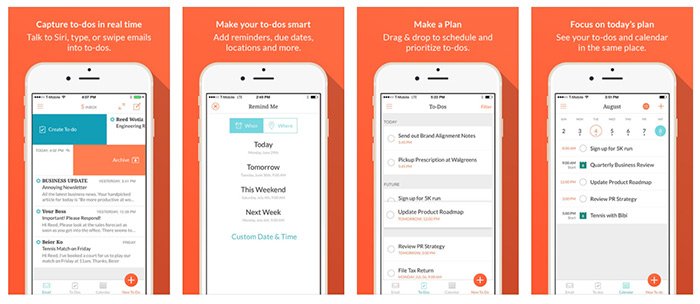
Handle merges email, calendars, reminders and to-dos. These things are often related — an email can be a to-do item, reminder or calendar appointment traveling incognito. You can create to-do reminders and add new calendar appointments from email by swiping left on messages.

“This app is one of the most exciting productivity tool!”

With a few simple habits, Handle can help you stay on top of your workday. Handle is free and available at Google Play and Apple Store.

What Can You Do?

1. Capture – Turn emails into to-dos, talk to Siri, or type

Related articles

Leading Australian Psychic Shares Her Views On The Year 2026

First Wolf Moon of 2026: In Cancer Brings Emotional Clarity

Handle: How To Manage Email & Calendar OverloadHandle is a simple, powerful web app that lets you manage all your Gmail or other emails, inboxes, to-do lists, and reminders from one place. So you can process your emails more efficiently, highlight your priorities instantly, and focus your effort on the right tasks at the right time.
2. Organize – Schedule & prioritize to-dos, add reminders, due dates, and more

Handle lets you power through your email in a fraction of the time with its simple interface and intuitive keyboard shortcuts. A single tap is all it takes to delete a message, file one for future reference, prepare a reply – or even unsubscribe from a pesky mailing list.
Handle: How To Manage Email & Calendar Overload
3. Focus – See to-dos on your calendar so you know what to do next

It’s your to-do list, made useful. With a tap or two, highlight important emails to deal with today, add new reminders to your list, or assign emails and tasks to a project. Handle keeps all of the things you need to get done together, organized, and visible. So you don’t ever lose track.

Few Tips

– Turn emails into to-dos simply by clicking “t”

– 2 powerful views: side-bar within Gmail or go full screen

– Use words like ‘today’ to have reminders automatically setup

By default, Handle automatically archives email from which you create to-dos, reminders or choose to read later, which you can do by swiping right on a message. You’re supposed to be able to disable this feature in the app’s settings, but in my tests it still archived messages after I changed the setting.

Reviews

“SIMPLY WOW !!!”

“Great updates to this app. Better than anything I’ve ever used, and still improving. Keep up the good work.”

“Handle it the easiest way to get my emails onto my to-do list. Once I started creating to-dos from my emails, it made me feel like I had mastered my inbox!”

“Couldn’t live with out this app!”

Tags: applifestyletechnology
Previous Post

Want To Know What MAC’s Makeup Studio Looks Like?

Next Post

How To Pick The Right Moisturiser For Your Skin Type

Frederique Bros

Frederique Bros

Frederique Bros is the founder of Women Love Tech and is a contributor for The Carousel.

Related Posts

Psychic
Astrology

Leading Australian Psychic Shares Her Views On The Year 2026

03/01/2026
Full Moon
Astrology

First Wolf Moon of 2026: In Cancer Brings Emotional Clarity

03/01/2026
liver
World

Why July is a Goldmine for Creators

22/07/2024
eyes
World

What Your Eye Colour Says About Who You’re Attracted To

07/06/2024
Vanuatu
Destinations

Vanuatu – Five Reasons To Put It On Your Bucket List

03/05/2024
April Brodie Buccal Facial
World

This Facialist Sticks Her Fingers in Your Mouth. And There’s a Six-Month Wait List to Try It!

16/04/2024

Recommended

female beauty

Skincare Product Review: Biore Yuzu Lemon Skincare Collection

25/05/2021
What sort of car am I? How to choose the right car for you.

How To Choose The Right Car For You

24/06/2016

Recent Posts

slicked hair kit x
Hair Skin & Body

Three Ways to Wear Wet-Look Hair

by Katrina Lawrence
09/01/2026
0

Like diamanté-trimmed tiger-striped caftans, wet-look hair is usually filed under 'Things Best Worn at the Beach'. However, the been-swimming-all-day style...

Read moreDetails
Gap year

Dear HSC Graduates (or Their Mums!), Before You Spend Your Gap Year in a London Pub, Consider This …

08/01/2026
Taiwan Travel

The Asian Island Set to be the New Hot Spot for Aussie Travellers in 2026 (Spoiler: It’s Not in Bali)

08/01/2026
Summer accessories

12 Summer Accessories to Help You Survive 35°C Days. SPF Not Included*

08/01/2026
Kylie Jenner Orange Dress

2026 is Only Six Days Old and Kylie Jenner Has Already Nailed The Look of The Year

06/01/2026

Subscribe to Newsletter

Be the first to get daily fitness news & tips from JNews Fitness.

  • Beauty & Fashion
  • Wellness & Health
  • Travel & Leisure
  • Food & Drink
  • Lifestyle & Homes
  • News
  • About Us
Foyster Media Pty Ltd Copyright 2025
No Result
View All Result
  • Beauty & Fashion
  • Wellness & Health
  • Travel & Leisure
  • Food & Drink
  • Lifestyle & Homes
  • News
  • About Us

© 2025 Foyster Media Pty Ltd. All rights reserved